
15 Minutes to Connect, 12 Weeks to Ship: The Hidden OAuth Clock for AI Agents
What I learned building OAuth Field Guide: every provider has two clocks, approval is the hard part, and code (not the model) should decide what's true.
Getting your AI agent connected to Slack takes about 15 minutes.
Getting it ready so any customer can connect can take 12 weeks.
I work on integrations at Adopt AI, so I run into OAuth a lot. But I didn't fully see this gap until I sat down and mapped it out for different apps. That turned into a small project called OAuth Field Guide. This post is about what I learned while building it.
Every provider has two clocks
When your AI agent needs to work inside Gmail, Slack or Zoom, there are really two questions:
- How long until it works with my own account?
- How long until any customer can connect, with no user limits, warnings or slowdowns?
The first one is almost always quick. The second one can take weeks, and that's the part the docs don't make clear.
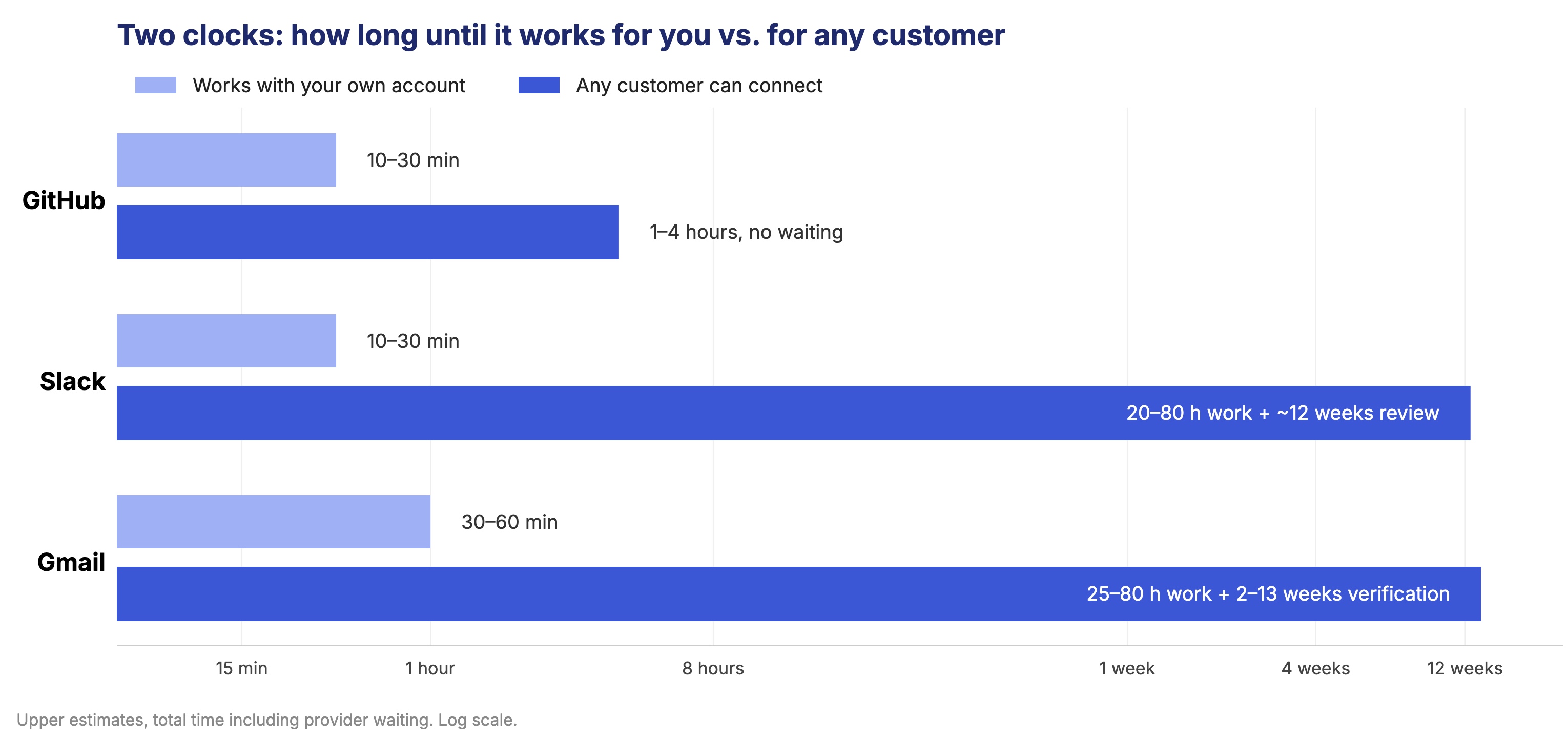
| App | Works with your own account | Any customer can connect |
|---|---|---|
| GitHub | 10–30 min | 1–4 hours, no waiting |
| Slack | 10–30 min | 20–80 hours of work, plus ~12 weeks of Marketplace review |
| Gmail | 30–60 min | 25–80 hours of work, plus 2–13 weeks of verification and a security assessment |
If you only plan for the first clock, your launch slips.
What I built
- 7 detailed guides: GitHub, Slack, Gmail, Zoom, Salesforce, Notion and LinkedIn. I picked them so every kind of approval process is covered by at least one real app.
- A live agent: type any other app and it researches it and writes a guide in the same format in a couple of minutes.
Each guide shows both clocks, what might block you, the steps as a checklist, and which steps an AI agent can do for you vs. where you need to take over (like logging in with 2FA, legal forms or waiting on the provider's review).
Here's what I learned along the way.
1. The hard part isn't setup, it's approval
Slack surprised me the most. You can share your app with other workspaces without any review. Sounds great. But since May 2025, apps that aren't on the Slack Marketplace can only read channel history once per minute.
So if your agent needs to read messages, you basically need Marketplace approval. Nothing in the setup flow tells you this.
Gmail is similar. Every scope that lets you read mail is "restricted", which means a yearly security assessment before real customers can use it.
That changed how I thought about the whole project. The useful question isn't "how do I set up OAuth?" It's "how long will this take, including the waiting, and what could block me?"
2. Don't let the model decide what code can decide
Each guide gets a difficulty rating: Quick, Moderate, Involved or High friction.
My first instinct was to let the model pick it. But then two guides for similar apps could get different ratings depending on how the model felt that day. So the rating is calculated in code, from the type of approval process, the specific requirements (like a demo video or security assessment) and the waiting time. The model never writes it.
Same with evidence. Every claim is labelled as:
- Tested: our agent checked it
- Source-backed: from official docs
- Community-reported: from forums or blogs
- Uncertain
Code enforces these. The model can't mark something as tested. "Source-backed" needs an official link. And if a URL never showed up in any source, it gets flagged.
The model is good at reading and writing. It's not something I'd trust to grade its own homework.
3. My checks caught my own mistakes
To test what an agent can honestly do without real accounts, I added simple live checks. For example: send a fake client ID to the real login and token pages and see how they respond, and check that the docs links actually work. Across the 7 guides, 34 out of 34 checks pass.
But the more useful part was what failed before that.
- My first version "fixed" Slack's OAuth URLs to match the ones in Slack's official discovery file. Turns out that file only covers "Sign in with Slack", not installing a bot. My "fix" was wrong. Now a mismatch only counts if the guide's own URL actually fails.
- GitHub returns a 404 for an unknown client instead of a normal OAuth error. That looked like a broken link. The check now looks at the response body instead of just the status code.
I also checked the most surprising claims from the research against the original sources myself. All 8 held up. Twice, a secondary article disagreed with the official docs. The guides follow the official source and show the conflict as uncertain.
4. It's okay to say "I don't know"
Some apps don't have public OAuth at all. Some don't publish how long their review takes. Some details only exist behind a login.
Instead of filling those gaps with guesses, the guides say it plainly:
- If an app has no public OAuth, you get a short guide about the alternative.
- If less than 40% of a guide's claims are backed by evidence, it's marked Unrated instead of getting a difficulty score.
- Steps based on general OAuth practice (not that app's docs) are marked as assumed.
- When the docs run out, the guide turns the open questions into a ready-to-send message to the provider.
A guide that admits what it doesn't know is more useful than one that sounds sure about everything.
5. A free API key forced a better design
I built the live agent on a free Gemini key. Google Search inside Gemini returned rate limit errors on every model I tried.
Instead of asking everyone to set up billing, I changed the approach. The model suggests likely docs pages, my code fetches them and follows OAuth-related links on the provider's official website, and then one model call reads them all.
This turned out to have a nice side effect: every source in a guide is a page we actually downloaded, so the agent can't cite something that doesn't exist. The downside is that forums aren't searched, so community-reported problems can be missed. Each guide says this.
A few other things the free tier taught me:
- The main model allowed only 20 requests a day and was often overloaded, so calls fall back to other models in order.
- Research is saved in steps, so if the last step fails, I don't pay for the research again.
- A run takes about 3 model calls. Library guides and repeat lookups cost nothing.
- Before every run, a free test call checks that the API key works, so a bad key never wastes a run.
6. Working with coding agents is mostly about making decisions
I built this with Claude Code. I treated it like a small team where the agents were the engineers and I was the product lead.
What helped the most was writing the rules before any code:
- A principles file: be honest over confident, keep the slice focused, be clear about what the agent does vs. the human.
- A plan broken into sprints, with a checkpoint at every big decision.
- An operating guide for the agents: research first, suggest options, wait for my decision, grade the evidence, update the docs after every sprint.
Separate research agents wrote the 7 guides in parallel, all following one shared format. Every guide had to pass a validator, then the live checks, then my own spot checks.
The agents did the research and the building. The decisions at each checkpoint were mine. Honestly, that's where most of my time went, and I think that's the real skill now.
What's still missing
- No agent creates real OAuth apps or submits reviews, so anything inside a logged-in console is "source-backed" at best.
- On a free key, forums aren't searched.
- Review times that providers don't publish (like LinkedIn, or Slack in practice) stay uncertain.
Next, I'd like to grow it to 100 apps, rerun the checks on a schedule to catch changes, and let you switch between scope sets in a guide. Gmail with only send access is a very different story from Gmail with read access.
Try it
To run the live agent, open Settings and paste a free Gemini API key from aistudio.google.com/apikey. The 7 guides work without one.
If you've been through an OAuth review that took way longer than expected, I'd love to hear about it. And if there's an app you want me to add next, let me know.